Best answer

Find/Replace Text (Ninja Forms to Google Docs)

  • April 30, 2020
  • 3 replies
  • 388 views

I have this medical history form that my patients fill out and I want to create a clean google document. The problem I am having is that when a box is checked, it adds the word “checked” on the form, I would like to replace all instances of the word “checked” with an X or checkmark or something like that. I have  124 separate  check boxes that this applies to…. I can’f figure out how to do it other than creating 124 formatter/replace’s. 

There has to be an easy way to do this! Please help!! Any advice or suggestions welcome! 
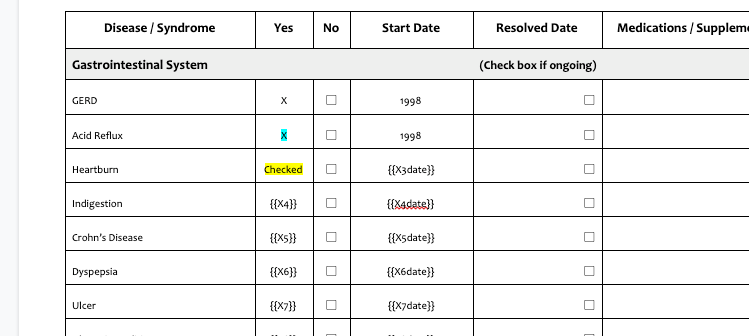
 

Best answer by beyondbecca

Thank you all for your willingness to help! I found a script online that I was able to edit and add to my template that replaces the words when the form is opened up. It was exactly what I needed. 


This is the script:

  function onOpen() {

  var body = DocumentApp.getActiveDocument().getBody();

  // Formatting the med hx form
  body.replaceText("Unchecked", " ");
  body.replaceText("Checked", "X");
  body.replaceText("remove", " ");

  }

This post has been closed for comments. Please create a new post if you need help or have a question about this topic.

3 replies

Liz_Roberts
Forum|alt.badge.img+8
  • Zapier Staff
  • May 4, 2020

Hi @beyondbecca ,

Thanks for reaching out- happy to help!

To make sure I am understanding correctly, you are:

  • taking a form in Ninja Forms with a checkbox that when ticked 
  • is pushed over to Google Sheets where the ticked box reads “Checked”
  • and you are looking to have these ticks from Ninja come over as ticks in your Google Form. 

Is that accurate? Additionally, could you share a screenshot of your configuration so we can look into what options may work best?

Will be on the lookout for your response!


ForYourIT
Forum|alt.badge.img+7
  • Tinkerer
  • May 4, 2020

This would probably require either a formatter with the “replace” action, or some code that converts it and puts in an array.

Like @Liz_Roberts  said, please give some more details with outputs, configuration, etc.


Cheers!


  • Author
  • Beginner
  • Answer
  • May 4, 2020

Thank you all for your willingness to help! I found a script online that I was able to edit and add to my template that replaces the words when the form is opened up. It was exactly what I needed. 


This is the script:

  function onOpen() {

  var body = DocumentApp.getActiveDocument().getBody();

  // Formatting the med hx form
  body.replaceText("Unchecked", " ");
  body.replaceText("Checked", "X");
  body.replaceText("remove", " ");

  }