Best answer

Extract specific words from GMail using formatter, ignoring some words at the same time.

  • August 7, 2020
  • 1 reply
  • 142 views

Hi,


New to Zapping so please help accordingly.

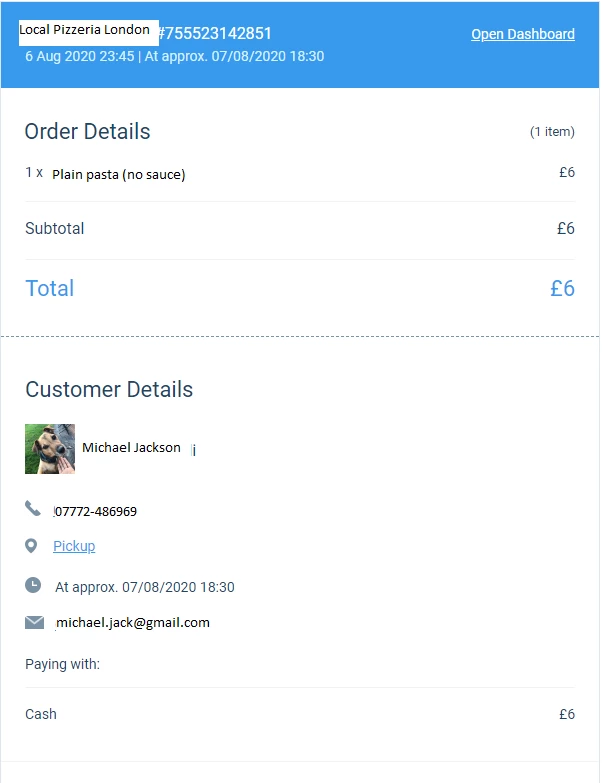
Image for reference of my Gmail template. (details aren’t personal, just a made up order


I need to extract the customer name, email and number currently listed under Customer Details. I have somewhat managed to extract the number but I am unable to extract the name as it is in the same line as “Customer Details” 

I want to create a new contact after this using these details AND send a SMS via Clicksend. Currently I have only managed to create a zap that extracts their number and sends them an SMS.


Any help please?


Best answer by steph.n

Hi there @agentfourty7 - Thanks for the question! It looks like you could explore Formatter by Zapier with focus on Splitting text.

Could you give this a try and let us know if it worked for you? Thanks!

This post has been closed for comments. Please create a new post if you need help or have a question about this topic.

1 reply

steph.n
Forum|alt.badge.img+8
  • Builder
  • Answer
  • August 24, 2020

Hi there @agentfourty7 - Thanks for the question! It looks like you could explore Formatter by Zapier with focus on Splitting text.

Could you give this a try and let us know if it worked for you? Thanks!