

Best answer

Entering data in a custom field

  • July 30, 2021
  • 2 replies
  • 59 views

I’d like for my zap to run at, say, 2 specific times each weekday.

I know I can use Schedule by Zapier -> Every Day but for the “Time of Day” field can I enter 2 specific times? If so, what is the correct format?
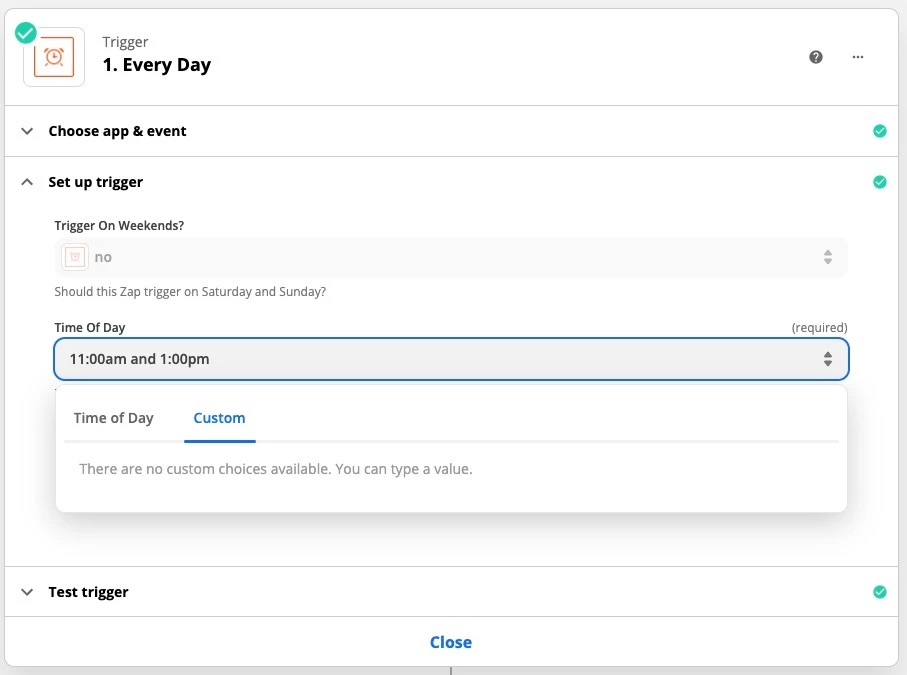
 

So far I’ve tried
   11:00am, or 1:00pm
but the zap only ran at 11am and ignored the 1pm time.

If I can do this without consuming additional tasks then Zapier would be great.

Best answer by Troy Tessalone

Hi @a1angeles 

You’d need 2 separate Zaps, 1 for each desired time to run.

Info on Tasks vs Zaps: https://zapier.com/help/manage/history/learn-about-tasks-in-zapier

This post has been closed for comments. Please create a new post if you need help or have a question about this topic.

2 replies

Troy Tessalone
Zapier Orchestrator & Solution Partner
Forum|alt.badge.img+14
  • Zapier Orchestrator & Solution Partner
  • Answer
  • July 30, 2021

Hi @a1angeles 

You’d need 2 separate Zaps, 1 for each desired time to run.

Info on Tasks vs Zaps: https://zapier.com/help/manage/history/learn-about-tasks-in-zapier


nicksimard
Forum|alt.badge.img+11
  • Zapier Staff
  • August 3, 2021

Hi @a1angeles!

To save tasks you could use recurring calendar events, then trigger on those events happening. Not ideal, but you could create a calendar that’s not visible to you in your calendar app of choice (since that could get pretty cluttered). That would mean you wouldn’t need multiple Zaps...just one that triggers on events in that calendar.



