Best answer

Creating a Zap in Airtable when I hit a targeted sum

  • November 29, 2019
  • 3 replies
  • 2131 views

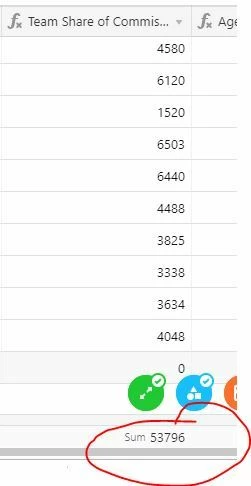
I have created a table in Airtable in which I have a running sum at the bottom of a particular field. I would like to create a zap when the sum for that field hits $50,000 and then one for when it hits $75,000. I can't figure out if it's possible to have a particular sum as a trigger since the sum is not part of a record. Thanks!

zap_post.jpg


Best answer by AndrewJDavison

Hi @shareberg

I'm wondering if you could create another column with a formula that tallies the total, and then create a view that filters until this total goes over $50k? Then you could create a "New Record In View"-triggered zap.

@Openside probably knows best what's possible here.


This post has been closed for comments. Please create a new post if you need help or have a question about this topic.

3 replies

AndrewJDavison
Forum|alt.badge.img+11
  • Zapier Solution Partner
  • Answer
  • November 30, 2019

Hi @shareberg

I'm wondering if you could create another column with a formula that tallies the total, and then create a view that filters until this total goes over $50k? Then you could create a "New Record In View"-triggered zap.

@Openside probably knows best what's possible here.


Openside
Forum|alt.badge.img+3
  • Zapier Solution Partner
  • November 30, 2019

Hi @shareberg - @AndrewJDavison_Luhhu is correct. You would need to get that information into another table via a rollup field in order to retrieve it via Zapier. The group level aggregation values (sum, avg, etc) are not available via the API, and so not able to be retrieved externally.


  • Author
  • November 30, 2019

Thank you. I can't seem to find a reasonable way to tally a running total but I'll play around with a rollup field. I'm still learning Airtable so I'll try and figure it out. Thanks so much