

Answer

Create Google doc using template, then export it as PDF and send it by email

  • May 24, 2022
  • 3 replies
  • 2414 views

Hello,

I think I managed to use “Create Document from Template in Google Docs” and “Send Outbound Email in Email by Zapier” separately, but I can’t find how to generate the PDF and then send the PDF by email. Could you help me please ? 

Many thanks ! 

A.
Best answer by GetUWired

Hi @airelle 

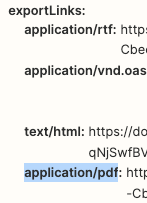
The “Create Document from Template in Google Doc” step will return an export link which can be passed along into your email step as an attachment


This post has been closed for comments. Please create a new post if you need help or have a question about this topic.

3 replies

GetUWired
Forum|alt.badge.img+12
  • Zapier Solution Partner
  • Answer
  • May 24, 2022

Hi @airelle 

The “Create Document from Template in Google Doc” step will return an export link which can be passed along into your email step as an attachment


Troy Tessalone
Zapier Orchestrator & Solution Partner
Forum|alt.badge.img+14
  • Zapier Orchestrator & Solution Partner
  • May 24, 2022

Hi @airelle 

Here’s a related help topic:


Forum|alt.badge.img+4

Hey @airelle! I just wanted to check in here and see if you were able to get your Zap up and running, or if you need further help troubleshooting? 🙂








