Question

Cognito form with check box options mapped to an excel table's respective columns based on the checkbox selected

  • August 7, 2024
  • 3 replies
  • 76 views

Forum|alt.badge.img

I have a cognito form with questions that allows the user to vote (select) for all the checkboxes that apply to them.  I need to map those answers to the respective column in excel so I can track how many votes each option gets.  

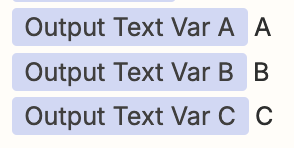
For example, if they form submitted was for this:

 

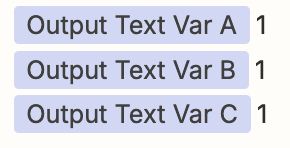
Then I need to add a row that looks like this:

 

I know I need to use formatter but I’m not sure where to start with this one.  If I can get the #’s, that’s fine, I can work with the actual option such as “Ancillary products” in the cell but must be in the correct column.


This post has been closed for comments. Please create a new post if you need help or have a question about this topic.

3 replies

Troy Tessalone
Zapier Orchestrator & Solution Partner
Forum|alt.badge.img+14
  • Zapier Orchestrator & Solution Partner
  • August 7, 2024

Hi @Kim_M 

Help link for how Excel spreadsheets need to be configured to work in Zaps: https://help.zapier.com/hc/en-us/articles/8496044256909-How-to-Setup-Your-Microsoft-Excel-sheet-to-Work-With-Zapier


Forum|alt.badge.img
  • Author
  • Beginner
  • August 7, 2024

I’ve got excel table set up properly but how do I take the outputs of the trigger from cognito forms, and add them to the matching columns.  If this is the input of the trigger:

How do I get my row to fill in like this?


Troy Tessalone
Zapier Orchestrator & Solution Partner
Forum|alt.badge.img+14
  • Zapier Orchestrator & Solution Partner
  • August 7, 2024

Hi @Kim_M 

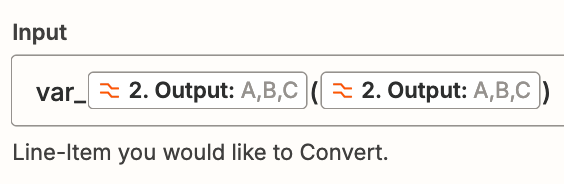
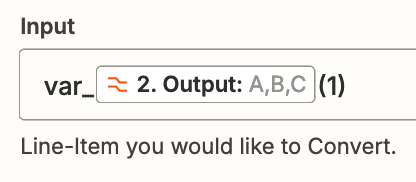
You’ll have to add logic in the Zap steps to convert the comma separate list to their own variables.


Try these Zap steps:

  • Formatter > Utilities > Text to Line Items
  • Formatter > Utilities > Line Items to Text


OR