
Best answer

Clear a salesforce date field with Zapier

  • December 9, 2020
  • 5 replies
  • 850 views

Hello,

Is it possible to Clear/delete a salesforce date field with Zapier ?

Thanks for your answers

Best answer by Troy Tessalone

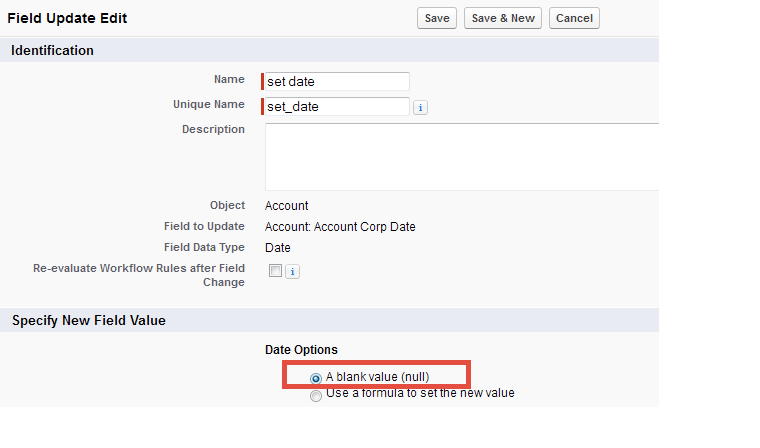
One possible workaround is to use a Zap to set a specific date value (e.g. 1900-01-01) for the given field, and couple that with a Salesforce Workflow Rule that does a Field Update to set a NULL value.
 

This post has been closed for comments. Please create a new post if you need help or have a question about this topic.


5 replies

Troy Tessalone
Zapier Orchestrator & Solution Partner
Forum|alt.badge.img+14
  • Zapier Orchestrator & Solution Partner
  • Answer
  • December 9, 2020

One possible workaround is to use a Zap to set a specific date value (e.g. 1900-01-01) for the given field, and couple that with a Salesforce Workflow Rule that does a Field Update to set a NULL value.


  • Author
  • Beginner
  • December 9, 2020

Thanks for your answer Troy.

So i guess there is no way to use a keyword in Zapier to clear the field, like the $$CLEAR$$ command you can use in Hubspot actions to clear a specific field. Is that right ?


Troy Tessalone
Zapier Orchestrator & Solution Partner
Forum|alt.badge.img+14
  • Zapier Orchestrator & Solution Partner
  • December 9, 2020

I am unsure, there may be.


nicksimard
Forum|alt.badge.img+11
  • Zapier Staff
  • December 11, 2020

Hi @Davd alves!

I can confirm that there is no way to do this with Zapier alone. We have an existing feature request, and I’ve gone ahead and added you to that. 

In the feature request I saw a comment that had this from a customer:

As a workaround, we managed to use Zapier to update fields which then trigger Salesforce process builder to update the fields we wanted with null values. A little clunky but seems to get the job done!

So it looks like Try was on the right path :)


  • Author
  • Beginner
  • December 11, 2020

Thanks for both Reply, I wil work around all that



