Best answer

Can an interface element be made to open different URLs depending on a table value?

  • December 21, 2025
  • 5 replies
  • 29 views

Forum|alt.badge.img

Concrete example:  An Interface user has chosen between having Zoom open in the Zoom App or in the Browser (two different URLs).  The user’s choice is stored as a value in a table.  Can I have a single Button (or other element) on the Interface open one or the other URL depending on the user’s choice?

Thanks for sharing!

Best answer by barncrow

Thanks guys!  I’m exploring those options, but Copilot is telling me that neither Buttons, Text, nor Links can be used to serve up a URL from a table...the URL has to be hard-coded in the configuration UI.  This, or course, means that I cannot serve up different URLs depending on which user is logged in...which kind of defeats the whole idea.

It might work with a table view on the interface page...but those are just ugly.  :(

Using a Button to trigger a Zap is no good either:  Zaps can’t open webpages in the browser.

I have to say I’m a bit baffled, and disappointed, that Interface elements can’t reference data in Zapier’s own tables.

5 replies

Sparsh from Automation Jinn
Forum|alt.badge.img+6

Hey ​@barncrow,

I think conditional logic can be helpful for your case- https://help.zapier.com/hc/en-us/articles/25167217084045-Use-conditional-logic-to-show-fields-in-forms. I don’t think though it works for buttons.

You can also try to trigger a Zap from the button and apply some conditional logic from there but they may not be as integrated in the interface itself. Hope it helps!


Troy Tessalone
Zapier Orchestrator & Solution Partner
Forum|alt.badge.img+14
  • Zapier Orchestrator & Solution Partner
  • December 22, 2025

Hi ​@barncrow 

Help links for using Zapier Interfaceshttps://help.zapier.com/hc/en-us/categories/14490381804173-Interfaces


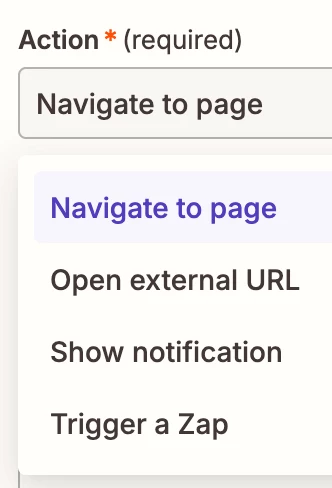
Component: Button

Actions:

  • Navigate to page
  • Open external URL
  • Show notification
  • Trigger a Zap


Instead, you’ll probably want to use a Zap to set a specific Table Field value, then reference that field value as a formatted link in the Text.

Component: Text

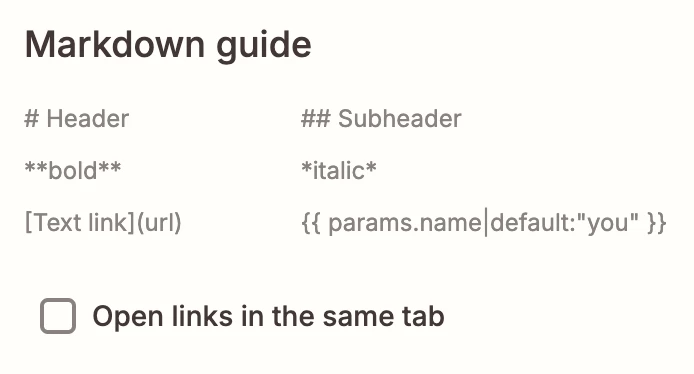
Reference the Markdown guide for how to format values.


Forum|alt.badge.img
  • Author
  • Beginner
  • Answer
  • December 22, 2025

Thanks guys!  I’m exploring those options, but Copilot is telling me that neither Buttons, Text, nor Links can be used to serve up a URL from a table...the URL has to be hard-coded in the configuration UI.  This, or course, means that I cannot serve up different URLs depending on which user is logged in...which kind of defeats the whole idea.

It might work with a table view on the interface page...but those are just ugly.  :(

Using a Button to trigger a Zap is no good either:  Zaps can’t open webpages in the browser.

I have to say I’m a bit baffled, and disappointed, that Interface elements can’t reference data in Zapier’s own tables.


Troy Tessalone
Zapier Orchestrator & Solution Partner
Forum|alt.badge.img+14
  • Zapier Orchestrator & Solution Partner
  • December 22, 2025

@barncrow 

You can submit feedback and feature requests via a ticket to Zapier Support to be logged for consideration: https://zapier.com/app/get-help


SamB
Community Manager
Forum|alt.badge.img+11
  • Community Manager
  • January 6, 2026

Appreciate you sharing this ​@barncrow. You’re right, it’s not currently possible to dynamically reference table values in that way. Totally see how that would be useful though, so I’ve shared the need for this with the Product team, along with your comments to give them more context. Can’t make any promises, but hopefully it’s something they can add in the future. 🙏

In the meantime, do the URLs themselves need to be dynamic? If not and a form is capturing the choice between two possible URLs, perhaps you could remove that question from it and instead route the user to another page after submission where two buttons are shown, letting them make the choice there. Could that approach work?