Answer

Automating Smartsheet submissions to Process Street

  • December 12, 2024
  • 5 replies
  • 34 views

Hello,

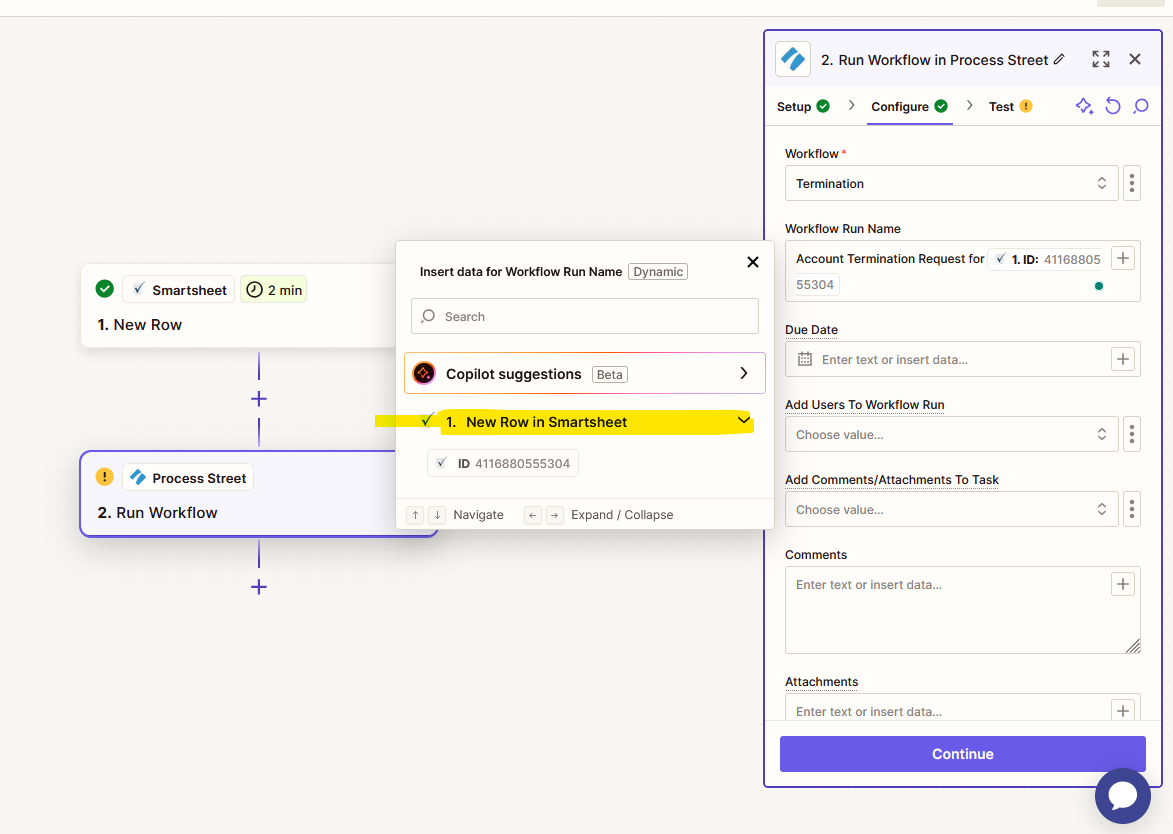
I would like to automate Smartsheet submission form to Process street workflow. I started, but I can’t pull out the field information from Smartsheet.  Your help is much appreciated.

Best answer by Troy Tessalone

@fkeita 

Did you test Zap step 1?

Help link for how to test Zap steps: https://help.zapier.com/hc/en-us/articles/18811411817741-Test-Zap-steps

This post has been closed for comments. Please create a new post if you need help or have a question about this topic.

5 replies

Troy Tessalone
Zapier Orchestrator & Solution Partner
Forum|alt.badge.img+14
  • Zapier Orchestrator & Solution Partner
  • December 12, 2024

Hi ​@fkeita 

Help us have more info by posting screenshots showing how your Zap steps are outlined and configured in EDIT mode and elaborate about what specific issues you are having with the Zap steps.


Help links for using Smartsheets in Zaps: https://help.zapier.com/hc/en-us/articles/8495976241805-Common-Problems-with-Smartsheet


  • Author
  • New
  • December 12, 2024

Here is the screenshot. It supposed to pull out column information.


Troy Tessalone
Zapier Orchestrator & Solution Partner
Forum|alt.badge.img+14
  • Zapier Orchestrator & Solution Partner
  • Answer
  • December 12, 2024

@fkeita 

Did you test Zap step 1?

Help link for how to test Zap steps: https://help.zapier.com/hc/en-us/articles/18811411817741-Test-Zap-steps


  • Author
  • New
  • December 12, 2024

Thank you, it worked. I was able to run the automation.


JammerS
Forum|alt.badge.img+6
  • Zapier Staff
  • December 13, 2024

Wow! Thank you for confirming that Troy’s resolution got the Zap running. This will significantly help our Community members to have as a reference for the same issue.