

Question

Automating file management for chatGPT outputs with zapier

  • November 17, 2024
  • 3 replies
  • 65 views

Hello,

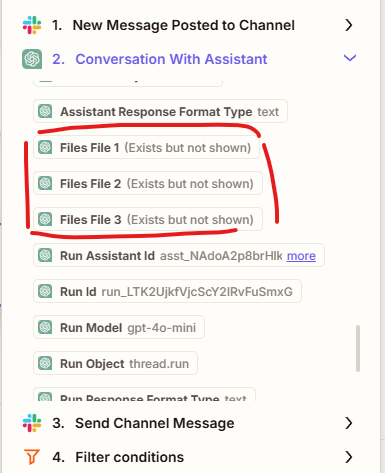
I’m currently using a ChatGPT assistant to generate a set of files. It can be one file, or it can be up to ten—it varies. I’d like to set up a process in Zapier that loops through all the generated files so they can be sent or attached to other apps.

How can I do that?


This post has been closed for comments. Please create a new post if you need help or have a question about this topic.

3 replies

ken.a
Forum|alt.badge.img+6
  • Zapier Staff
  • November 18, 2024

Hi there ​@WebJ,

Welcome to the Community! 🎉

You can use Looping by Zapier as your action step to run an action or set of actions more than once. You can learn more about Looping by Zapier here: https://help.zapier.com/hc/en-us/articles/8496106701453-Loop-your-Zap-actions

Hopefully, this helps.


  • Author
  • Beginner
  • November 18, 2024

Hi,
I tried, but I’m not sure how to set it up. From what I understand, these are not line-items but individual data outputs, and I can’t manage to create the loop. Or at least, I haven’t figured out how to do it.

Can you help me out?


SamB
Community Manager
Forum|alt.badge.img+11
  • Community Manager
  • November 21, 2024

Hi ​@WebJ 👋

Hmm, I wonder if you could update the instructions for the ChatGPT assistant to ask it to output the files as line items rather than separate fields? 🤔 Thinking that should then allow you to select a single field that contains each file as a separate line item which can be used to set up the Looping action. 

Can you give that a try and let us know if it works as hoped?



