Question

Adding Tags in Aweber

  • January 2, 2021
  • 3 replies
  • 213 views

Here is all I want to do:

  1. Subscriber fills out form in Squarespace
  2. If there is an existing subscriber in Aweber, I want a tag to be added
  3. If there is no existing subscriber, I want to create a new one.

I have tried every iteration of “find and create” or “update” and some thing with a filter that Zapier support told me to try like, six months ago, and none of it is working.  I even contacted one of your recommended experts who thought they fixed it, and it turns out they did not. 

Can somebody please tell me exactly how to do this?  I really want this fixed and will pay somebody if they can do it without issue.  

Please help. 

Thank you

JS

 

This post has been closed for comments. Please create a new post if you need help or have a question about this topic.

3 replies

Troy Tessalone
Zapier Orchestrator & Solution Partner
Forum|alt.badge.img+14
  • Zapier Orchestrator & Solution Partner
  • January 2, 2021

Zap Steps

  1. Trigger: Squarespace New Form Submmission
  2. Action: AWeber Find/Create Subscriber
  3. Action: Filter (for existing Subscriber found)
  4. Action: AWeber Update Subscriber

@jakeysnakey83DM if you need help getting this configured.


nicksimard
Forum|alt.badge.img+11
  • Zapier Staff
  • January 4, 2021

Hi @jakeysnakey83!

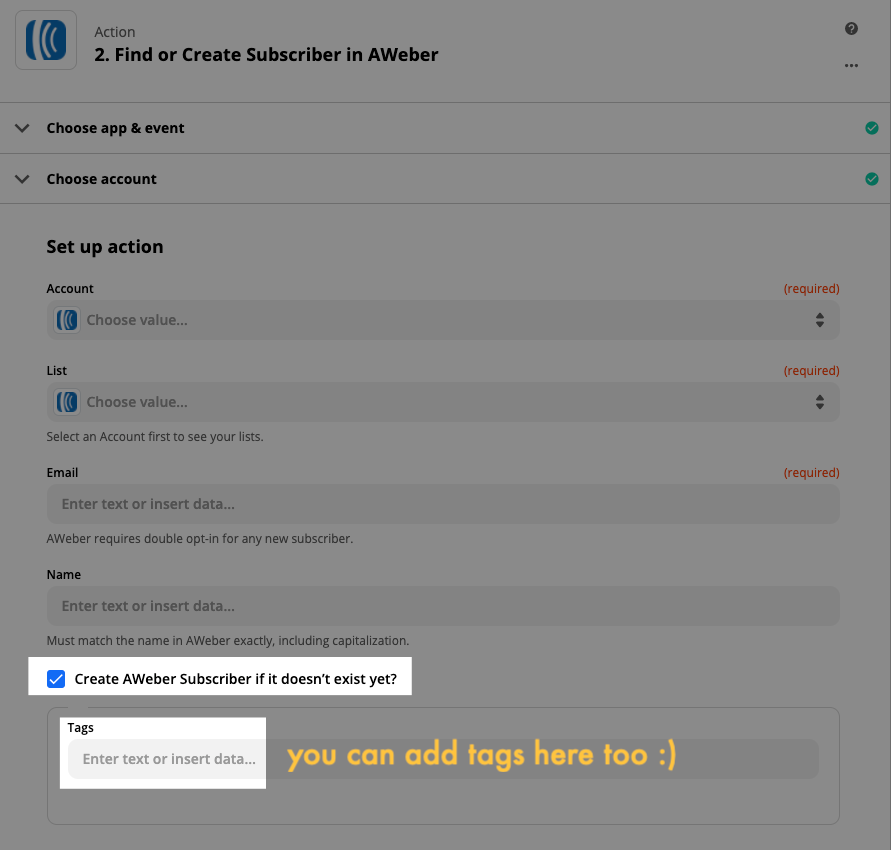
What Troy mentioned above should do it for you. On the Find/Create step you can add the tags:

Then the Filter will stop the Update step from happening when you’ve created something. Otherwise, you’ll update whatever is found :)


AndrewJDavison
Forum|alt.badge.img+11
  • Zapier Solution Partner
  • March 31, 2021

@jakeysnakey83 
Just checking in to see if you still need help with this?