Best answer

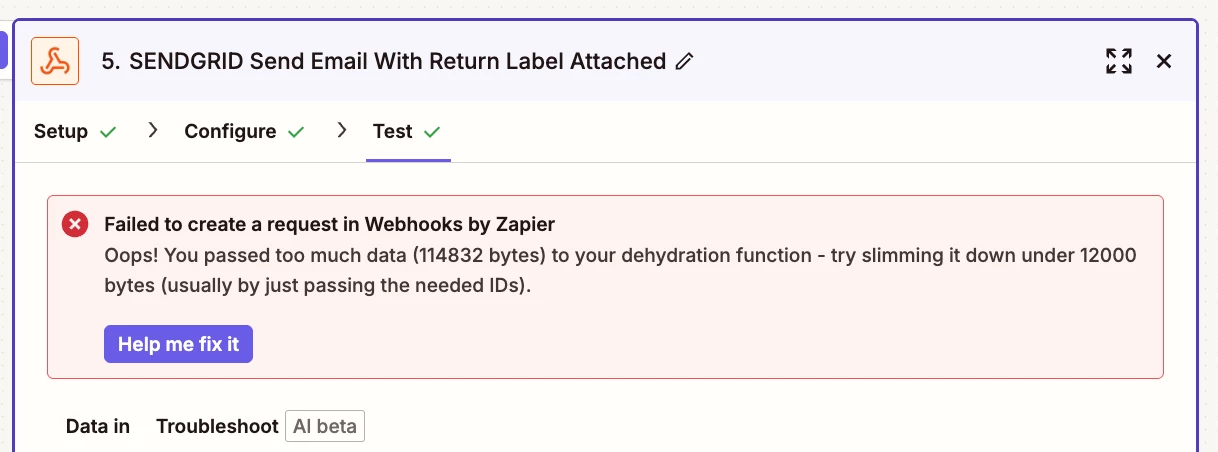
No longer able to send email attachments with Webhooks - getting “Oops! You passed too much data…” errors

  • October 3, 2025
  • 4 replies
  • 41 views

Forum|alt.badge.img+1

I have a shipstation API that returns a shipping label and that shipping label data I pass into attachments data field for Sendgrid. This used to work but now that I have been forced to update to latest version of webhooks API it no longer works and throws this error. 


Maybe intentional change now but means attachments in webhooks is functionally impossible?


Best answer by DennisWF

@Akrause have you tried uploading the label to some temporary CDN, and just passing the resulting URL to your webhook step? Cloudinary has a free tier that I use sometimes for this purpose. 

This post has been closed for comments. Please create a new post if you need help or have a question about this topic.

4 replies

DennisWF
Forum|alt.badge.img+5
  • Zapier Solution Partner
  • Answer
  • October 4, 2025

@Akrause have you tried uploading the label to some temporary CDN, and just passing the resulting URL to your webhook step? Cloudinary has a free tier that I use sometimes for this purpose. 


SamB
Community Manager
Forum|alt.badge.img+11
  • Community Manager
  • October 9, 2025

Hi ​@Akrause 👋 Have you had a chance to try DennisWF’s suggestion yet? 

Let us know if that does the trick!


Forum|alt.badge.img+1
  • Author
  • Beginner
  • October 9, 2025

Thanks! Good idea ​@DennisWF - Instead I moved over to Gmail using a new dummy account. Wildly expensive waste to pay $20/mo for ‘just’ a dummy email account but it did solve my problem. 

Amazingly I also tried to use SendGrid’d actual integration, but that also does not allow attachments.

If we keep needing it at this scale, will try Cloudinary! Much smarter than what I actually did.


SamB
Community Manager
Forum|alt.badge.img+11
  • Community Manager
  • October 10, 2025

Glad you were able to get it sorted ​@Akrause - thanks for following up here! 🤗 And thank you to ​@DennisWF’s for sharing that clever idea! 🧡