Question

Is there a webhook history?

  • May 30, 2023
  • 7 replies
  • 480 views

danielp

Hi!

Is there a log to see which calls have been made to a webhook, like https://hooks.zapier.com/hooks/catch/11111111/xxxxxxx?

We have a Zap triggered by a call to the webhook which works 80% of the time, but there’s a 20% that is lost. The Zap history doesn’t show any errors.

It seems unlikely that the call wasn’t made, so looking into a log would be helpful.

Thanks!

This post has been closed for comments. Please create a new post if you need help or have a question about this topic.

7 replies

Troy Tessalone
Zapier Orchestrator & Solution Partner
Forum|alt.badge.img+14
  • Zapier Orchestrator & Solution Partner
  • May 30, 2023

Hi @danielp 

Good question.

The Zap Runs History will show triggered Zap Runs while the Zap is ON: https://zapier.com/app/history/

Zap triggers have built in deduplication.

That means you may need to add a unique value with each webhook request to make the request unique.

You can use a UNIX timestamp.


danielp
  • Author
  • New
  • May 30, 2023

Thanks, Troy. 

The payload is different every time. It's unlikely a deduplication problem, but still a log would be helpful to debug. 

d


Troy Tessalone
Zapier Orchestrator & Solution Partner
Forum|alt.badge.img+14
  • Zapier Orchestrator & Solution Partner
  • May 30, 2023

@danielp 

The Zap Runs is all that is available.


stevepowell
  • Beginner
  • September 27, 2023

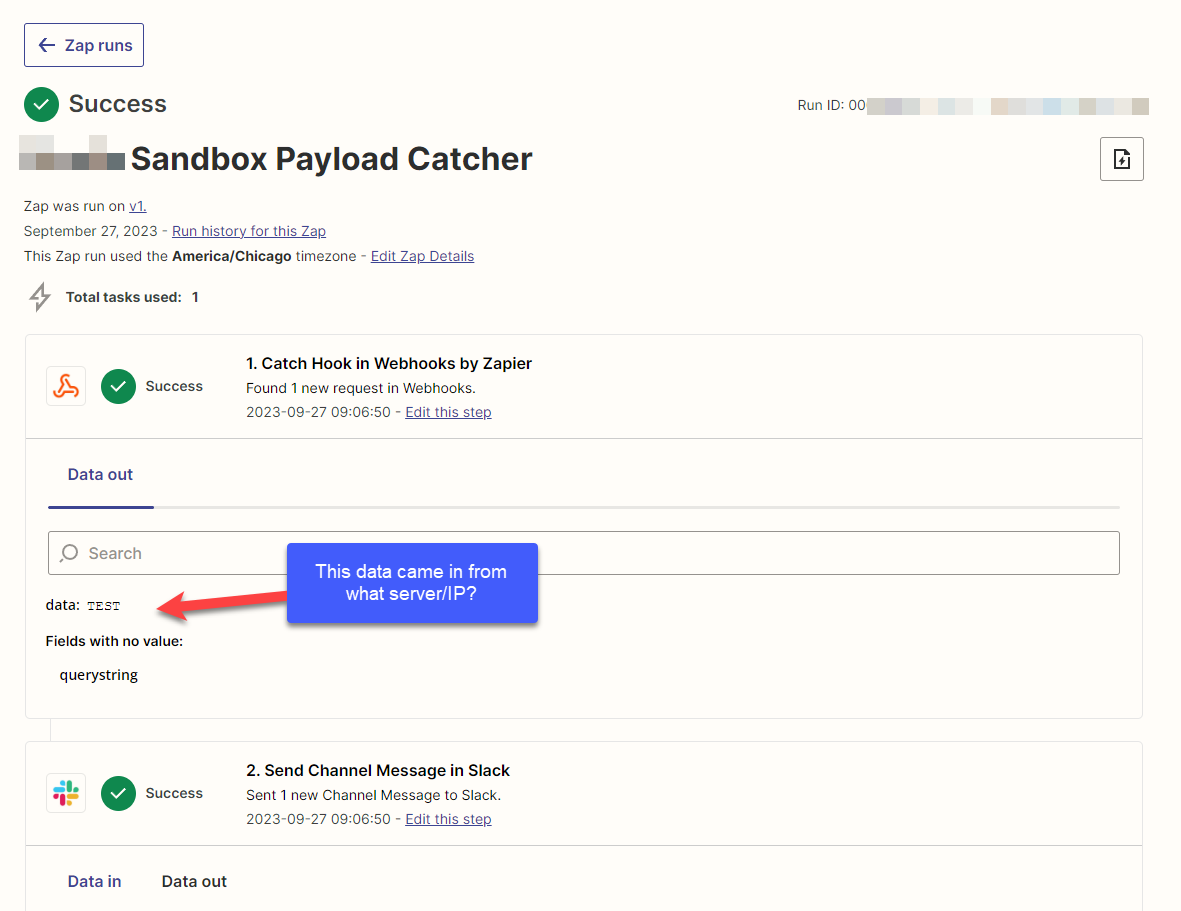
So, to be clear, there is no place where we can see what server/IP address that the Zapier webhook call came from, correct?


Troy Tessalone
Zapier Orchestrator & Solution Partner
Forum|alt.badge.img+14
  • Zapier Orchestrator & Solution Partner
  • September 27, 2023

Hi @stevepowell 

Zap Runs will be where to look.

If the same data is sent to the same webhook, then Zapier will see that as a duplicate.


That means you may need to add a unique value with each webhook request to make the request unique.

You can use a UNIX timestamp.


stevepowell
  • Beginner
  • September 27, 2023

Ok, so it’ s not shown to the user then. There is no IP/Server information on the Zap Run/History nor the Zap Run Details screen.  To be clear, I’m not asking about duplicated data. Here’s a sample… where did this Zap catch this data from?  Where did this data originate from?


Thanks.


Troy Tessalone
Zapier Orchestrator & Solution Partner
Forum|alt.badge.img+14
  • Zapier Orchestrator & Solution Partner
  • September 27, 2023

@stevepowell 

Yeah that metadata is not exposed in the Zap Runs history details.

Help articles about webhooks: https://zapier.com/apps/webhook/help


You can submit feedback and feature requests via a ticket to Zapier Support to be properly logged: https://zapier.com/app/get-help


The URL is secured by obscurity. It is almost impossible to guess the combination of the number and code in the URL. But if you make the URL public (e.g. in front-end JavaScript) anyone who finds it will be able to spam it and trigger your Zap. Treat it as a password or any other secret!