Question

How to extract specific UTM fields from a webhook to Google Sheets

  • February 23, 2026
  • 2 replies
  • 22 views

Hi All, 

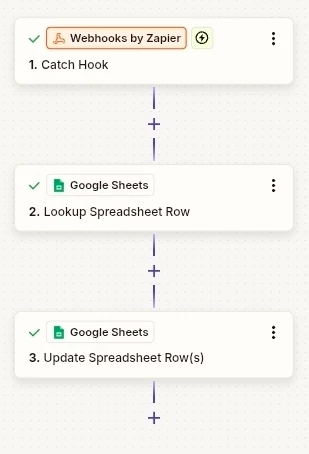
I am using a webhook to update a spreadsheet row. See screenshot below for the current setup.
 

The informatie I need in the Google Sheets is found in the record if I test the webhook. See screemshot below. 

 

I need the UTM Source, UTM Campaign and UTM Medium in the Google Sheet. When I try to select them at step 3 I shows me a lot of fields out of the webhook data but not the fields I need. See screenshot.
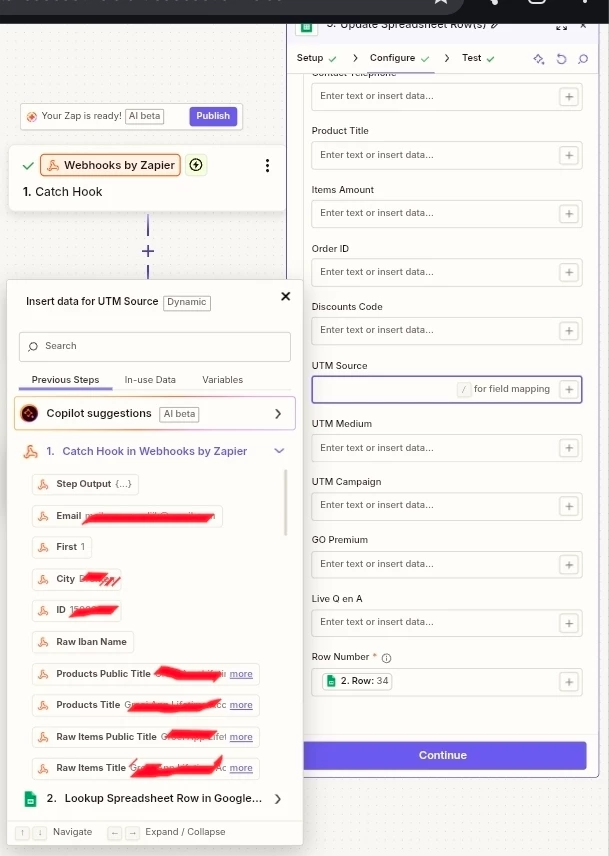


How do I get the speficiek fields out of step 1 in my list here at step 3? 


Thanks! 

2 replies

Sparsh from Automation Jinn
Forum|alt.badge.img+6

Hey ​@XRoadNL,

Try using Formatter → Text → Extract action to extract the UTM parameters from the nested JSON.

After extracting them, you can dynamically pass them in Google Sheets action. Hope it helps!


Troy Tessalone
Zapier Orchestrator & Solution Partner
Forum|alt.badge.img+14
  • Zapier Orchestrator & Solution Partner
  • February 23, 2026

Hi ​@XRoadNL 

Try using the search to search for the variable label or the variable value to narrow the search results.

Try scrolling up/down to see all the variables returned from a Zap step.