


Best answer

How can I get this ID from this nested JSON object?

  • July 14, 2023
  • 2 replies
  • 344 views

Forum|alt.badge.img+1

I have a webhook step that outputs:

{
"value": [
{
"Id": 7555553,
"CustomerRoleId": 8032,
"CustomerId": 442656
},
{
"Id": 7555554,
"CustomerRoleId": 8031,
"CustomerId": 442656
},
{
"Id": 8421389,
"CustomerRoleId": 11975,
"CustomerId": 442656
}
]
}

In my next step I’d like to output the Id associated with CustomerRoleId: 11975.

What would be the best way to go about that? I thought about using a code step but the outputs from the previous step appear to be isolated like this:
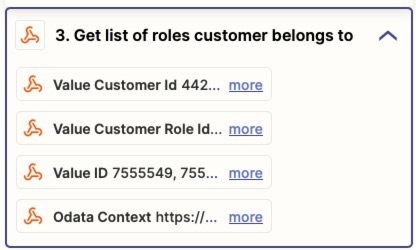
And so I can’t seem to act upon the raw output of my webhook step.

What do you think?

Best answer by Troy Tessalone

Hi @ericg 

Good question.

The output form the webhook is an array of objects.

OPTIONS

  1. Use the Looping app to loop thru each array object and follow that with a filter step.
  2. Ask AI
    1. e.g. Zap action: ChatGPT - Extract Structured Data
  3. Use a Code step to isolate the desired value.
    1. You can even ask ChatGPT for help with the Code


This post has been closed for comments. Please create a new post if you need help or have a question about this topic.

2 replies

Troy Tessalone
Zapier Orchestrator & Solution Partner
Forum|alt.badge.img+14
  • Zapier Orchestrator & Solution Partner
  • Answer
  • July 14, 2023

Hi @ericg 

Good question.

The output form the webhook is an array of objects.

OPTIONS

  1. Use the Looping app to loop thru each array object and follow that with a filter step.
  2. Ask AI
    1. e.g. Zap action: ChatGPT - Extract Structured Data
  3. Use a Code step to isolate the desired value.
    1. You can even ask ChatGPT for help with the Code


Forum|alt.badge.img+1
  • Author
  • Tinkerer
  • July 14, 2023

Thanks, Tony. I think Looping is where I’ll go with this one.

I tried to use a code step but got stumped because I couldn’t see a way to set the input as the raw JSON (see second screenshot).


