Question

Authentication issue

  • November 18, 2025
  • 7 replies
  • 39 views

Hi there so i am trying to integrate Zapier with the CRM that we’re using which is Building Connected and tied with Autodesk Platform Services.

Here are the issues.

  1. Authorization code (example: XXXXXXXXXXXXXXXXXXXXXXXXX) gets expired once after usage. 
  2. Access token gets expired after an hour


So what i did is i created a separate zap to run a schedule every hour to refresh the token but still it gets expired. Here is the [Loom recording removed by moderator] of my setup.


Please engaged here if you can help.

This post has been edited by a moderator to remove Loom video containing personally identifiable information (PII) and sensitive information. Please remember that this is a public forum and avoid sharing personal or potentially sensitive details like authorization codes, Zap links etc.

7 replies

Sparsh from Automation Jinn
Forum|alt.badge.img+6

Hey ​@rescueconcret,

Please post screenshot of Data In, Data Out as well as how each Zap step is configured for us to have more context.


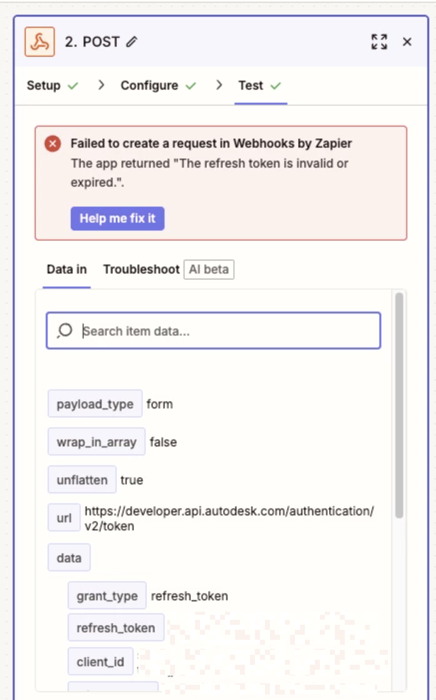
Hi here is the screenshot


this is the error now 

This post has been edited by a moderator to remove sensitive information. Please remember that this is a public forum and avoid sharing credentials, tokens, or other private details that could compromise your account security.


Sparsh from Automation Jinn
Forum|alt.badge.img+6

Hey ​@rescueconcret,

I see you are trying to directly access the API using the Webhooks in Zapier so it’s a bit more complex. For refreshing tokens you probably have to apply some kind of logic maybe using paths and sheets/ tables that if it’s greater than 1 hour since the last refresh token, you can call a sub-zap to generate a fresh one. If they are not too many API calls, you can also get away by generating a refresh token each time which may be easier but not ideal.

Here are helpful article about paths and sub zaps in Zapier- 

https://help.zapier.com/hc/en-us/articles/8496288555917-Add-branching-logic-to-Zaps-with-Paths

https://help.zapier.com/hc/en-us/articles/8496308527629-Create-reusable-Zap-steps-with-Sub-Zaps

Hope it helps!


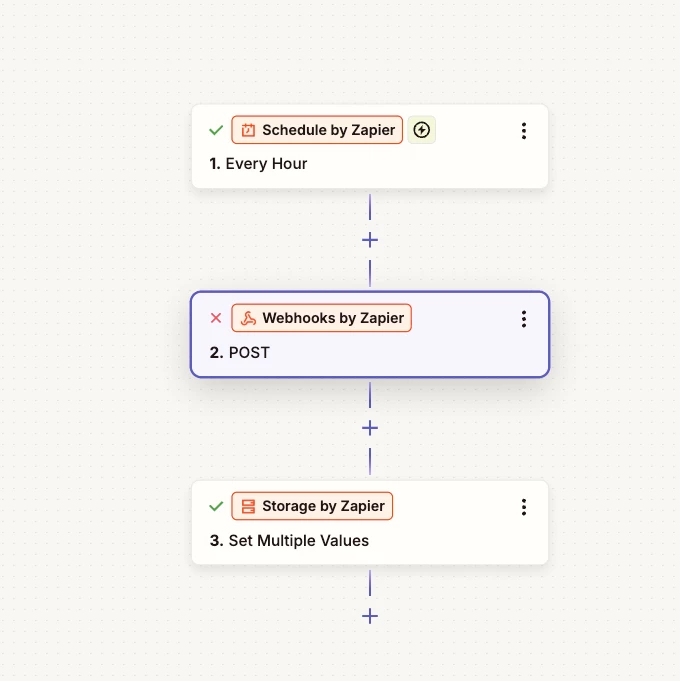
I actually have 2 zaps for that one is scheduled every hour to refresh the token and the other one is the main webhook for the opportunity


Sparsh from Automation Jinn
Forum|alt.badge.img+6

Your second action is not successful as shown by the cross sign.


Well basically it’s not and i am aware of the im just showing you my structure. because you’ve share about paths and sub-zap. So basically the second step is calling the API to post the refresh and access token. All generated tokens are stored in the last step. Also if you can check my DM i shared the loom recording link just to give you more overview.