Workaround: failure to trigger on new Slack reaction

  • Nov 13, 2024 4:06 AM UTC
  • 3 replies
  • 483 views

I set up a zap to trigger from a new emoji reaction added to a channel in Slack.

Zap steps:

  1. Trigger when a new emoji is added to a message in a specified channel
  2. Formatter: extract an email address from the message text to which the emoji was added
  3. Find the related record in a Zapier Table
  4. Update the record status to ‘Completed’ 

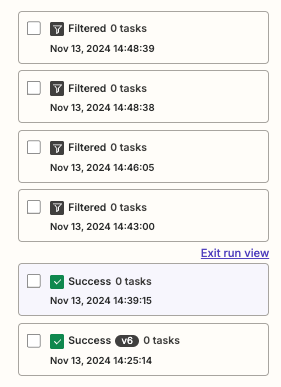
This was working fine during testing, but once turned on, was failing to trigger. I logged a support ticket with the team who notified me that there was a bug, and no known workaround. 

By pure coincidence - I found a workaround and thought I’d share it with the community in case anyone else is running into the same problem. I know I was racking my brain all day yesterday to come up with an alternative solution!

Workaround:

  1. When you configure the setup in the trigger step - leave the channel and emoji blank: 
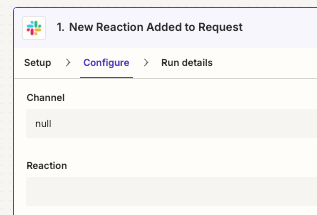
  2. This will attempt to trigger for new emojis added elsewhere in your workspace
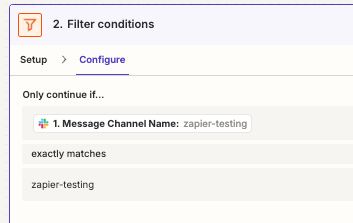
  3. Step 2 in zap: use a filter to only continue if the reaction is in a specific channel:
  4. This is working for me now:


Hope someone finds this useful! 
Nov 19, 2024 1:23 AM UTC

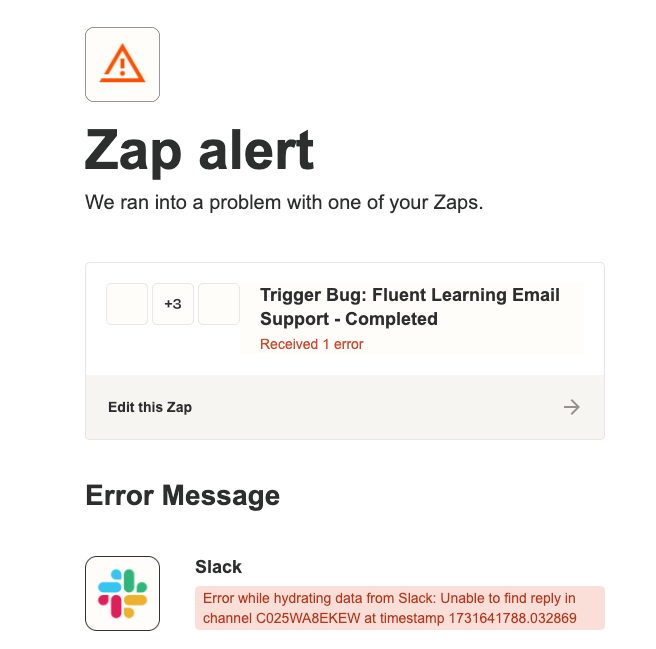
Just to add that setting it up this way, does trigger an error alert for the Zap every time an emoji is used elsewhere in Slack - but I am just ignoring these 🙂


This post has been closed for comments. Please create a new post if you need help or have a question about this topic.

3 replies

JammerS
Forum|alt.badge.img+6
  • Zapier Staff
  • Nov 14, 2024 2:31 AM UTC

Hi @Ren_B,


Thank you for sharing an awesome work around for when failure to trigger on new Slack reaction. This will significantly help our Community members.


  • Author
  • Beginner
  • Nov 19, 2024 1:23 AM UTC

Just to add that setting it up this way, does trigger an error alert for the Zap every time an emoji is used elsewhere in Slack - but I am just ignoring these 🙂


SamB
Community Manager
Forum|alt.badge.img+11
  • Community Manager
  • Nov 19, 2024 12:35 PM UTC

Thanks for the heads up on that ​@Ren_B. And thank you so much for sharing that helpful workaround here - awesome work! 🙌 I’m certain many in the Community will find it incredibly helpful. 🤗

Keep up the amazing work, we’d love to see more of your insights shared in the Community! 🧡