



As you’ve probably noticed if you’ve ever built a workflow that generates text via an LLM and then shares it to Slack, Slack doesn’t render normal markdown text properly, and you end up with a garbled mess including a bunch of messy tags like ###.
To solve this, I created a Zapier Function that is really just a wrapper around an open-source library called markdown_to_mrkdwn (https://github.com/fla9ua/markdown_to_mrkdwn). You can call the Function from within a Zap, pass in your regular markdown text as an input, and it’ll return the reformatted text ready for passing into a Slack step.
I don’t know of a way to directly share a Function outside of my own Zapier workspace, so just sharing the (super-simple) down code below.
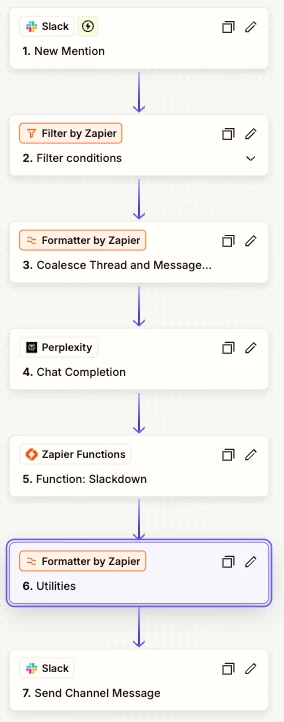
A basic sample use case is this Zap, which we use to ask Perplexity questions from within Slack. When we mention the @Perplexity bot we’ve added to our workspace, the question gets sent to Perplexity to generate a response, and we use the Slackdown Function to reformat it before replying in the Slack thread.
Hope this is useful!
"""
Function to convert conventional markdown text to the modified
version of markdown that Slack accepts.
Uses the markdown_to_mrkdwn library (https://github.com/fla9ua/markdown_to_mrkdwn)
"""

from markdown_to_mrkdwn import SlackMarkdownConverter


# Create a converter instance
converter = SlackMarkdownConverter()

# Convert markdown to mrkdwn
raw_markdown = zapier.trigger_output["rawMarkdown"]
slack_markdown = converter.convert(raw_markdown)

# Use the below code to return data from your Function
zapier.action.functions.return_function(
  params={
    "output_data" : {"slack_text" : slack_markdown} # Output / Return Values
  },
  type_of="write"
)



