Question

Date Formatting issue into SharePoint, Microsoft 365

  • October 26, 2023
  • 5 replies
  • 100 views

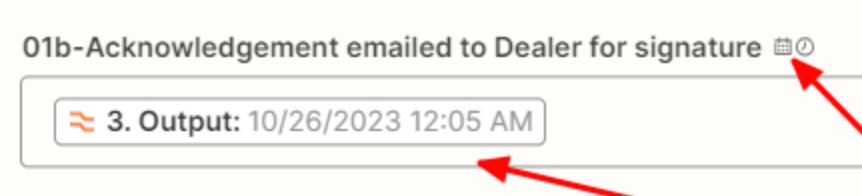
Webhook Trigger. The connection is good. Item ID and Text data working. Problem is Date Formatting not being accepted by SharePoint. Throwing code shown in attachment.

I have Date being formatted by formatter, and using that (as well as a ton of other attempts). The formatter tool works perfect. Even when I manually type in date with the exact format SharePoint shows and is set to, the fields do work together.

When I type exact format into SharePoint directly it accepts it. Hmmmm...…

https://cdn.zapier.com/storage/photos/daaef04863feac4d783342c1a5411f78.png


– Tom Murphy

This post has been closed for comments. Please create a new post if you need help or have a question about this topic.

5 replies

Troy Tessalone
Zapier Orchestrator & Solution Partner
Forum|alt.badge.img+14
  • Zapier Orchestrator & Solution Partner
  • October 26, 2023

Hi @Tomxyz 

Good question.

To help us have more context, we would need to see screenshots with how your SharePoint step is configured in the Zap edit mode.


  • Author
  • New
  • October 26, 2023

Here is what I have.


Thanks!


Troy Tessalone
Zapier Orchestrator & Solution Partner
Forum|alt.badge.img+14
  • Zapier Orchestrator & Solution Partner
  • October 26, 2023

@Tomxyz 

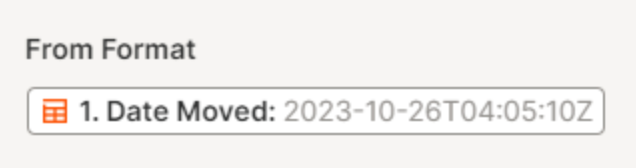
FYI: This is not a valid From Format as it’s an actual timestamp value instead of the format convention like YYYY-MM-DD


SharePoint likely expects a timestamp to be in a specific format. e.g. YYYY-MM-DDTHH:MM:SS


  • Author
  • New
  • October 26, 2023

Let me give that format a try!


Thanks For Shear This Blog !!