Best answer

How do I update YouTube video descriptions and tags with Zapier?

  • May 13, 2024
  • 15 replies
  • 174 views

Hi there,


I am looking for a way to update the description (and ideally the tags as well) of a YOUTUBE video. Now the video in every case already exists… I tried to use the Action builder but it always returned 400 Bad Request. 

Does anyone have any idea or a template how to only modify the description parameter of a single video?

Would really help me out.


Thanks. 

Best answer by ken.a

Hi @jpres,

I’m so sorry for the delayed response here.

Updating the description of the existing YouTube video is not possible at the moment since the current YouTube integration doesn’t have the “Update Video” action. However, we have an open feature request for this exact functionality.

I have added you to the feature request. That does a few things:

  • Bring this to the attention of the integration developers
  • Help track interest in this feature being implemented
  • Allows us to notify you via email if this feature becomes available in the future

While I don't have an ETA on when this feature might be implemented, we will notify you via email if it is!

Hopefully, this helps!

This post has been closed for comments. Please create a new post if you need help or have a question about this topic.

15 replies

Troy Tessalone
Zapier Orchestrator & Solution Partner
Forum|alt.badge.img+14
  • Zapier Orchestrator & Solution Partner
  • 34039 replies
  • May 13, 2024

Hi @jpres 

You would likely have to explore creating a Custom Action (with the help of AI) or using the YouTube API via the API Request action: https://developers.google.com/youtube/v3/docs


  • Author
  • New
  • 4 replies
  • May 13, 2024

Hi Troy,


the custom action did not work so far it always added a snippet {description} and I received a 400 error


Troy Tessalone
Zapier Orchestrator & Solution Partner
Forum|alt.badge.img+14
  • Zapier Orchestrator & Solution Partner
  • 34039 replies
  • May 13, 2024

@jpres 

For us to have more context, post screenshots with these:

  • error
  • how the Zap step is configured
  • how the custom action is configured

  • Author
  • New
  • 4 replies
  • May 13, 2024

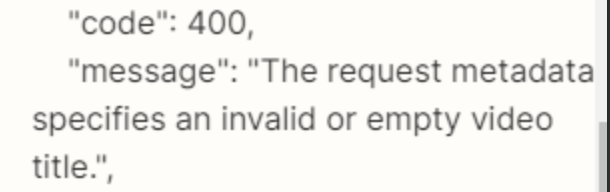
Attached the setup and response. I just entered about the same query as in my question… it generated 3 different samples… they all did not work


Troy Tessalone
Zapier Orchestrator & Solution Partner
Forum|alt.badge.img+14
  • Zapier Orchestrator & Solution Partner
  • 34039 replies
  • May 13, 2024

@jpres 

The error code indicates and invalid or empty video title.


  • Author
  • New
  • 4 replies
  • May 13, 2024

I passed the video ID… tried it with the link and the embedded link as well all did not work


Troy Tessalone
Zapier Orchestrator & Solution Partner
Forum|alt.badge.img+14
  • Zapier Orchestrator & Solution Partner
  • 34039 replies
  • May 13, 2024

@jpres 

You may have to pass the Video Title in addition to the Video ID and Video Description.


  • Author
  • New
  • 4 replies
  • May 13, 2024

No, does not work! 


Troy Tessalone
Zapier Orchestrator & Solution Partner
Forum|alt.badge.img+14
  • Zapier Orchestrator & Solution Partner
  • 34039 replies
  • May 13, 2024

@jpres 

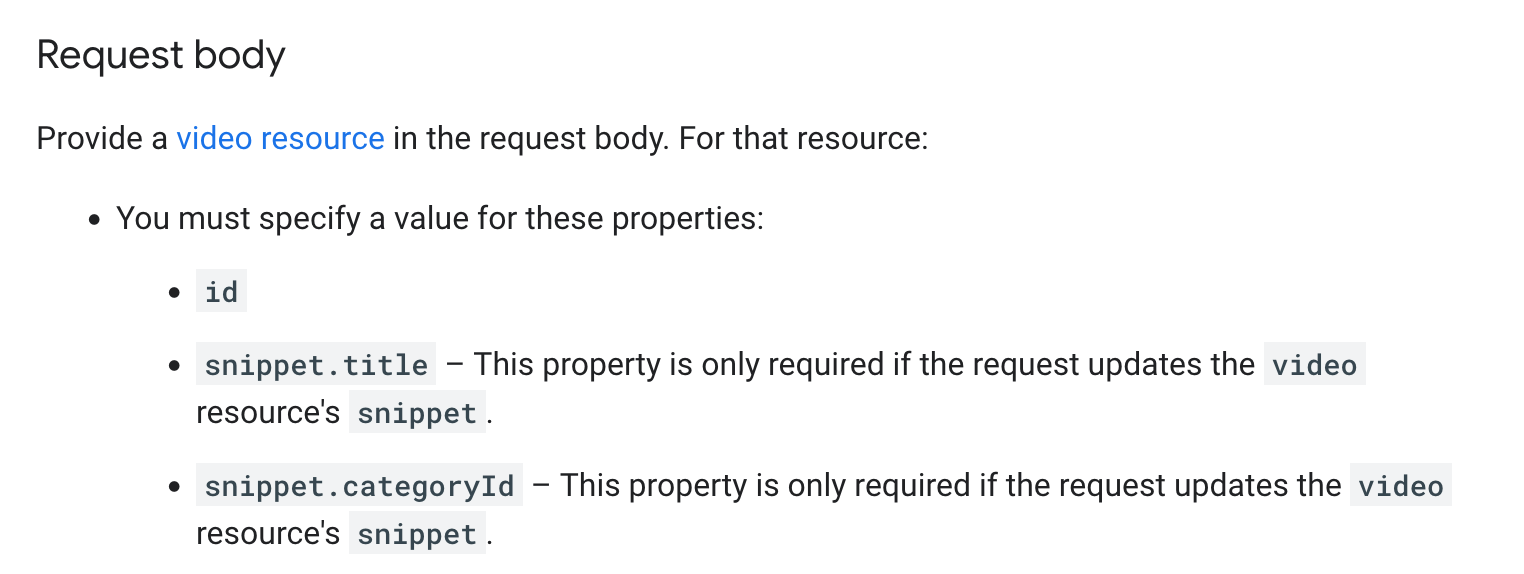
Per the YouTube API endpoint documentation for updating a video: https://developers.google.com/youtube/v3/docs/videos/update


fiona819
Forum|alt.badge.img+3
  • New
  • 118 replies
  • May 14, 2024

@jpres are you familiar with a little bit of coding? I think Troy is correct - you are not passing the right params over in the API request custom action block for Youtube. The custom action by Zapier did not suggest the correct request body. If you need more help directly, please let me know! 


ken.a
Forum|alt.badge.img+6
  • Zapier Staff
  • 6780 replies
  • Answer
  • July 22, 2024

Hi @jpres,

I’m so sorry for the delayed response here.

Updating the description of the existing YouTube video is not possible at the moment since the current YouTube integration doesn’t have the “Update Video” action. However, we have an open feature request for this exact functionality.

I have added you to the feature request. That does a few things:

  • Bring this to the attention of the integration developers
  • Help track interest in this feature being implemented
  • Allows us to notify you via email if this feature becomes available in the future

While I don't have an ETA on when this feature might be implemented, we will notify you via email if it is!

Hopefully, this helps!


Sandra Hoffmann
Forum|alt.badge.img
  • Zapier Solution Partner
  • 22 replies
  • February 19, 2025

@jpres

Per the YouTube API endpoint documentation for updating a video: https://developers.google.com/youtube/v3/docs/videos/update


Hi Troy,


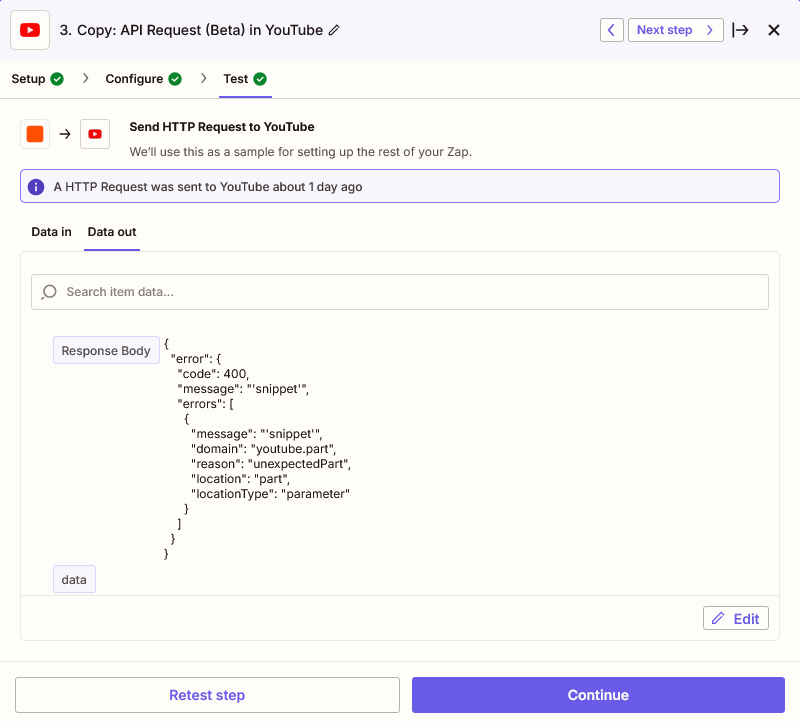
even if I provide all this data in the request body, I still get an error message. “Snippet”. It’s so strange.


Sandra Hoffmann
Forum|alt.badge.img
  • Zapier Solution Partner
  • 22 replies
  • February 19, 2025

To update YouTube video descriptions and tags using Zapier, you’ll want to set up a Zap that connects your trigger app with YouTube, targeting video updates. Unfortunately, Zapier's direct options for updating existing YouTube videos are limited, often due to restrictions within YouTube's API, which can sometimes lead to the "400 Bad Request" error you're experiencing. One workaround is to use the "YouTube API Request" feature in Zapier’s Webhooks by Zap action. With this, you can manually configure an API request to update video details, including the description and tags. To do this, you'll need to enable the YouTube Data API, set up authentication, and specify the video ID, description, and tags within the request body. This approach requires some technical setup but gives you the control to update your video details dynamically.

I am trying it like this now but the Authorization is not yet correct. It says “Invalid Credentials “

This post has been edited by a moderator to remove a link from a quoted spam post.


SamB
Community Manager
Forum|alt.badge.img+11
  • Community Manager
  • 9682 replies
  • February 20, 2025

Hi there, ​@Sandra Hoffmann 👋

It looks like angelinfanucci’s post was AI-generated and included a spam link. I’ve marked their post as spam and have removed the link from the quote in your message.

Can you share a screenshot of the set up of your YouTube API Request action so we can take a closer look at it to see what might be causing some trouble with it? Make sure to blur or remove all personal information (names, emails, addresses etc.) from screenshots before sharing - you can use a tool like Zappy for that.

Looking forward to hearing from you! 


Sandra Hoffmann
Forum|alt.badge.img
  • Zapier Solution Partner
  • 22 replies
  • February 21, 2025

Hi there, ​@Sandra Hoffmann 👋

It looks like angelinfanucci’s post was AI-generated and included a spam link. I’ve marked their post as spam and have removed the link from the quote in your message.

Can you share a screenshot of the set up of your YouTube API Request action so we can take a closer look at it to see what might be causing some trouble with it? Make sure to blur or remove all personal information (names, emails, addresses etc.) from screenshots before sharing - you can use a tool like Zappy for that.

Looking forward to hearing from you! 

Hi Sam,


thanks for helping out.

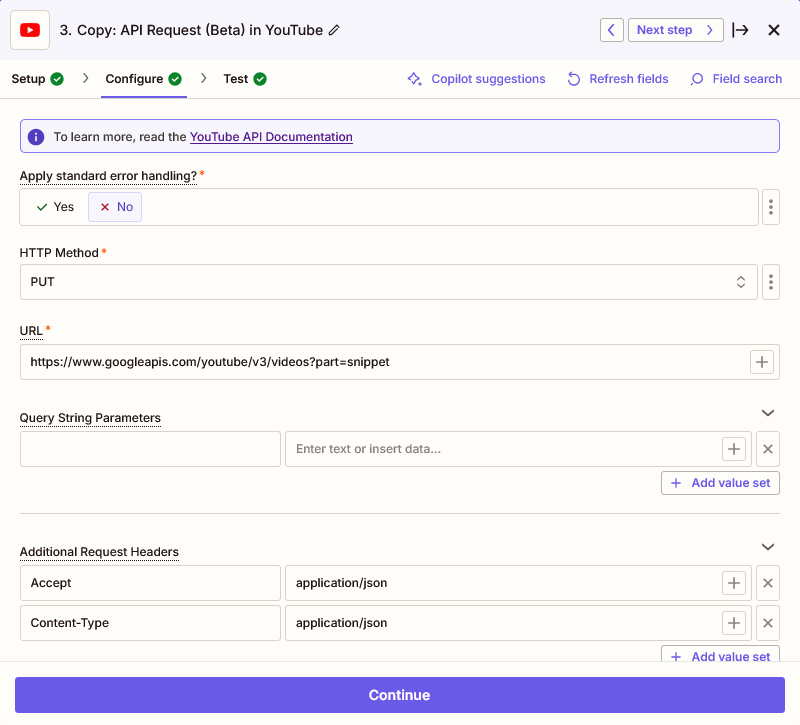
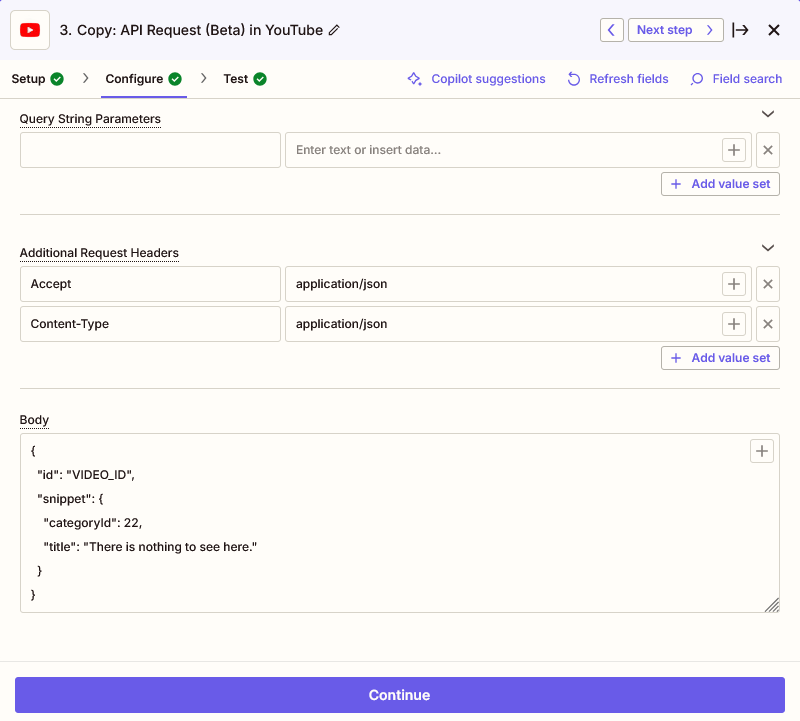
Here are the screenshots.

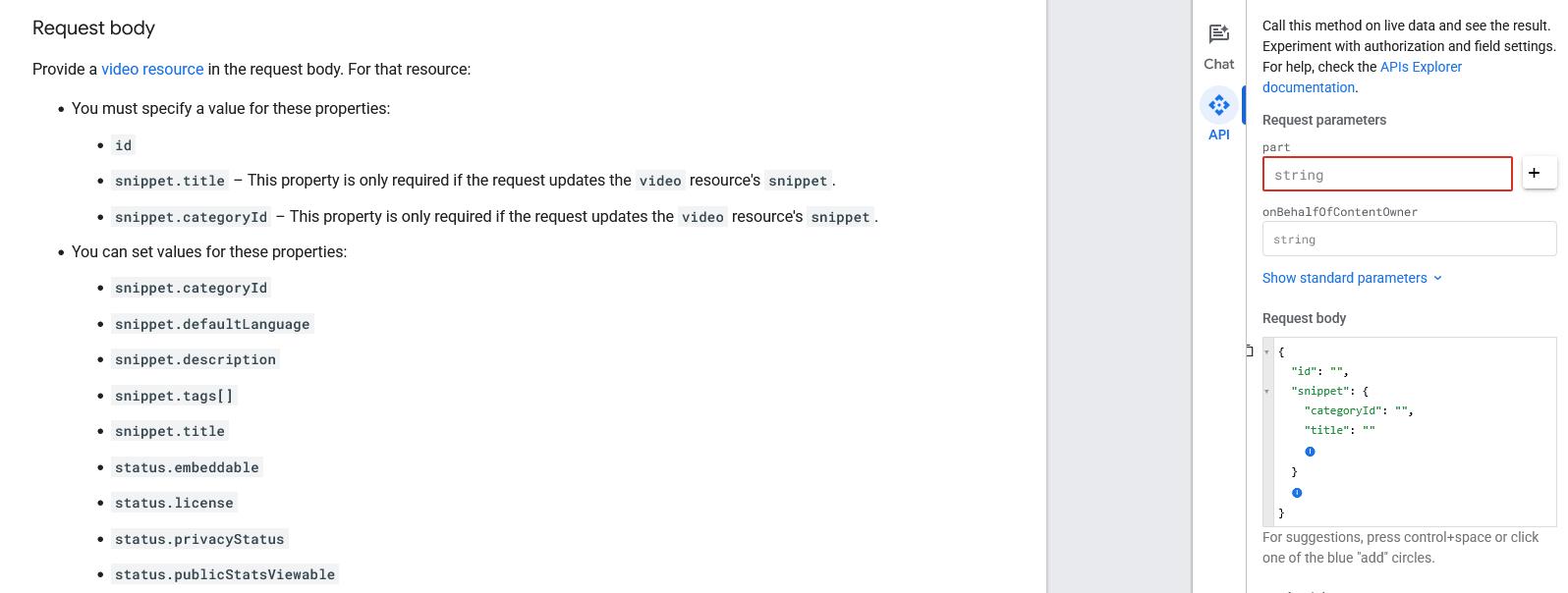
I am trying to use the API Request according to this documentation: https://developers.google.com/youtube/v3/docs/videos/update#request-body


Of course, I used a valid Video ID. I just removed it for the screenshot.


I have also tried putting an API Key in the url like this: https://youtube.googleapis.com/youtube/v3/videos?part=snippet&key=[YOUR_API_KEY] But I believe this is not necessary.


It seems to be a mistake in the snippet body which I can’t figure out. I copied the request body directly from the api doc. It worked there. The CategoryId is also correct.